Evaluating controls, requirements, and risks
Roles and permissions
The following users can evaluate controls, requirements, and risks:
Anyone with manager permissions for the evaluation
You’ll do the majority of your assessment work in the Evaluations tab. From here, you can assess your controls, requirements, or risks and record your findings. You can also assign evaluation work to different members of your team. As always, you can communicate with team members about a particular evaluation via the Activity Feed.
Tip
Active evaluations can also be accessed via Work items. From the left menu, select Work items, then select the Evaluations tab.
Tip
For more information, see the Tutorial videos at the bottom of the page.
To evaluate controls, requirements, or risks:
From the left menu, select Assessments.
Select your assessment.
Select the Evaluations tab.
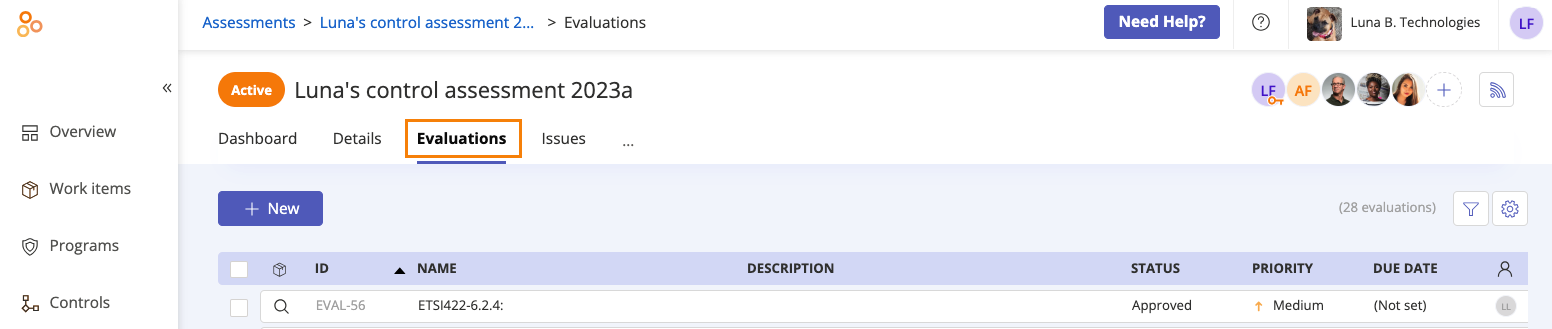
A list of evaluations corresponding to the assessment’s controls, requirements, or risks is displayed.
Select the evaluation you want to assess.
From the right pane, do any or all of the following:
Change the status of the evaluation
Tip
In a risk assessment, the evaluation status is located in the upper-left area of the screen. In control and requirement assessments, the evaluation status is located in the upper-right.
For control and requirement assessments, add or edit the evaluation reference. Note that Evaluation 1 and Evaluation 2 in Assessment 1, for example, cannot have the same reference value, but Evaluation 111 in Assessment 2 and Evaluation 1 can. The value can be empty; this does not affect uniqueness.
For risk assessments, expand the Research section to link a research item
Enter a description of the evaluation
Change the evaluation assignee. This can be an individual user or group.
Set the evaluation priority
Enter the due date
Enter your observations
View the evaluation source
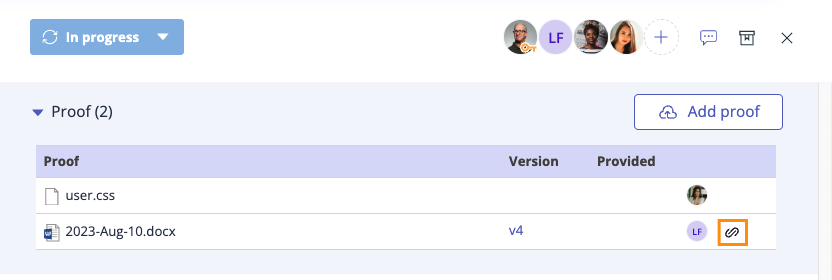
Expand the Evaluating section to link objects (e.g. labels), tasks, proof, or related issues
Tip
Proof that is indirectly linked to the evaluation is shown with an Indirect link icon.
Click the facepile in the right pane to manage user permissions for the evaluation
Communicate with team members via the Activity Feed
Tip
Looking to score controls (either numerically or categorically)? Create a custom field on your evaluations.