Linking and unlinking labels for a risk assessment survey
When you link a label to a risk assessment survey, survey responses are linked to the label as proof in PDF format.
Linking a label to a risk assessment survey
Roles and permissions
The following roles can link a label to a risk assessment survey:
Administrators with manager or contributor permissions for the risk assessment survey.
Compliance managers with manager or contributor permissions for the risk assessment survey.
From the left menu, select Assessments.
Select the Risk Surveys tab.
Click the name of the survey where you want to add a label.
The right pane displays details about the survey.
In the right pane under Labels, click +Add.
The Add labels window displays.
Select the checkbox next to the label you want to link.
Click Confirm.
The label is linked and displays in the list of labels.
Unlinking a label from a risk assessment survey
Roles and permissions
The following roles can unlink a label from a risk assessment survey:
Anyone with manager or contributor permissions for the risk assessment survey.
From the left menu, select Assessments.
Select the Risk Surveys tab.
Click the name of the survey where you want to unlink a label.
The right pane displays survey details.
In the right pane under Labels, hover over the right side of the row for the label you want to unlink.
Click the Unlink icon.
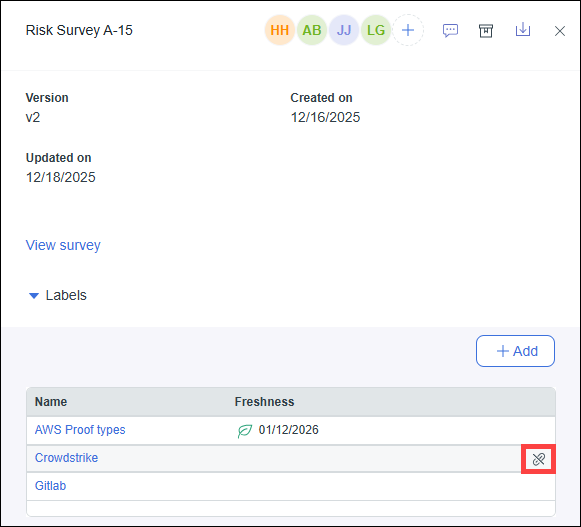
A confirmation message displays.
Click Confirm to unlink the label.