Archiving and unarchiving a proposed risk
Roles and permissions
The following roles can archive and/or unarchive a proposed risk:
Anyone who is a manager or a contributor on the risk intake register.
Archiving a proposed risk removes it from view, indicating that it has been rejected. Typically, archived proposed risks are not promoted to the Risk Register. Archiving doesn’t completely remove proposed risks from Hyperproof. This is helpful should you need to access an archived proposed risk later.
Archiving a proposed risk
From the left menu, select Risk.
Click the Intake register card.
Select the Risks tab.
Select one or more proposed risks that you want to archive.
Select the Archive link.

The Review and confirm window opens.
Click Confirm.
The selected proposed risks are archived.
Unarchiving a risk
From the left menu, select Risk.
Click the Intake register card.
Select the Risks tab.
Click the arrow next to the Risks tab, and then select Archived.
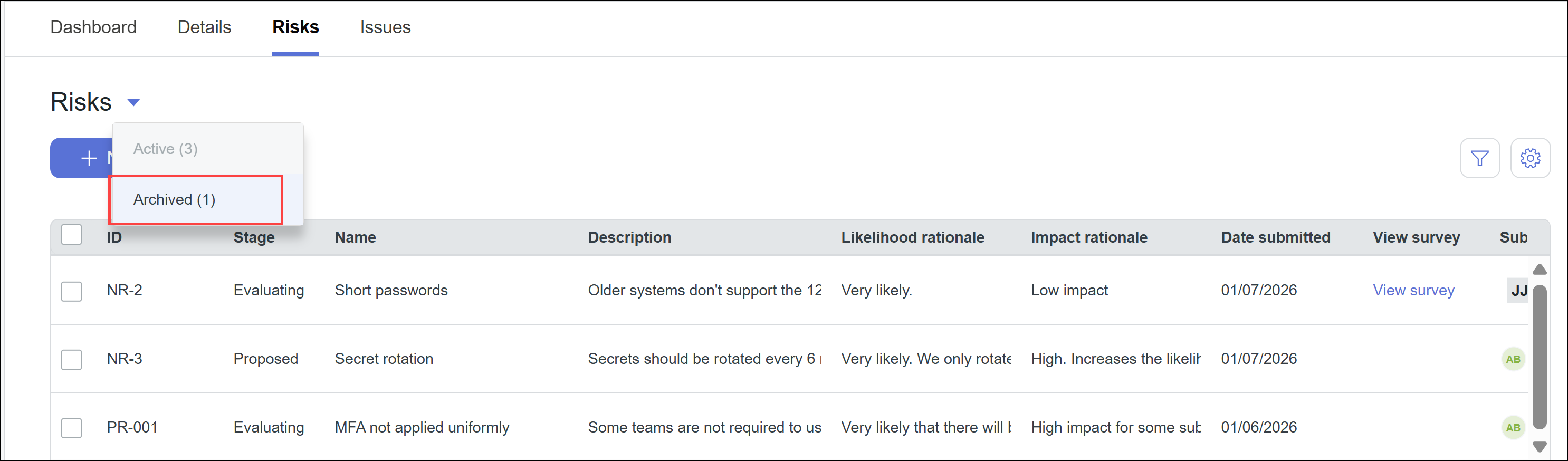
Select the proposed risks you want to unarchive.
Click Unarchive.
The risks are unarchived and moved back into the proposed risks list.
Viewing archived proposed risks
From the left menu, select Risk.
Click the Intake register card.
Select the Risks tab.
Click the arrow next to the Risks tab, and then select Archived.
The list of archived proposed risks displays.