Understanding the risk intake register tabs
Roles and permissions
The following roles can access the tabs on the risk intake register:
Anyone who is a member of the risk intake register.
The risk intake register allows you to collect and manage proposed risks. Each tab on the register provides you with tools and information to help you manage those risks.
Intake register dashboard tab
The dashboard contains widgets that tally the number of new and current proposed risks.

Proposed Risks - Displays the number of proposed risks that remain on the proposed list. These risks haven't been archived or promoted to the regular risk register.
Newly Proposed Risk - Displays the number of proposed risks that have been collected in the past 30 days.
Risks in Assessments - Displays the number of proposed risks that are being evaluated through a risk assessment.
Risk intake register details tab
Use the Details tab to view and edit the following information:
Details pane
Hover over a field and click the pencil icon to edit it.
Name - The name of your risk intake register.
Description - A description or additional information about the risk intake register.
Default risk owner - The Hyperproof user who is assigned as the default owner of any proposed risks collected using the intake survey or entered manually. When entering a proposed risk manually, you can edit the default owner. Proposed risks assigned to an evaluation or promoted to the risk register display this user as the owner.
Allowed email domains - Controls the email domains that are permitted to submit responses to your risk intake survey. This security feature ensures that only users from authorized domains, such as your organization's corporate domains, can propose risks via the intake survey.
To add an email domain, type the domain in the Allowed email domains field and press Enter. Add as many domains as needed, pressing Enter after each one.
Intake survey pane
Create survey - This option displays only if you have never configured your intake survey. Click Create survey to configure version 1 of your intake survey.
Update survey - Allows you to edit the survey content. Each time you edit and save a survey, the version number is incremented and displayed when viewing both the survey and its corresponding responses.
Survey link - Click the Copy link option to copy the URL for your survey. Distribute the URL to team members to collect proposed risks and associated information.
Updated on - Date the survey was last updated.
Member list - Displays icons representing the Hyperproof users who are members of the intake survey. Users who are members of the survey can update it.
Risk intake register risks tab
The Risks tab on the intake register displays a list of all proposed risks that haven't been promoted to one of your risk registers.
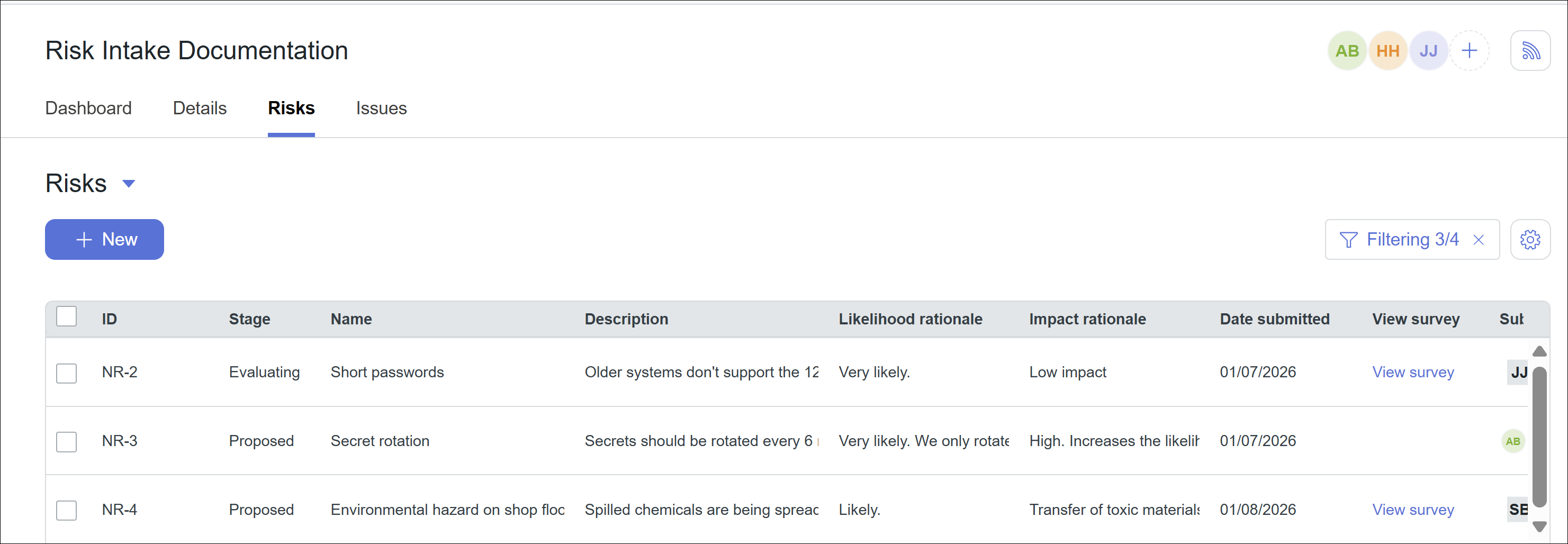
Risks tab fields and options include:
Risks dropdown arrow - Use this menu to switch between archived and unarchived proposed risks.
+New - Use this option to add a new proposed risk to the list.
Filters - Use the filter option to narrow the list of proposed risks based on the fields displayed in the grid.
Settings - Allows you to turn on or off columns in the grid and change their order.
Grid columns - The following fields display for each proposed risk and can be used as filter options:
ID - ID of the proposed risk. Default proposed risk IDs start with NR-. Risk IDs can be changed during the evaluation process or from the Risk Register.
Stage - Stage of the proposed risk. Stages include:
Proposed - The risk has been proposed, but no further action has been taken.
Evaluating - The risk has been added to an assessment for evaluation and possible promotion to the regular risk register.
Name - Name of the proposed risk.
Description - Additional information about the risk. This field is required when creating a new proposed risk.
Likelihood rationale - A short description of the likelihood that this risk will occur.
Impact rationale - A short description of the impact of this risk.
Date submitted - Date the proposed risk was submitted.
Submitter - Name and initials of the person who submitted the proposed risk. Note that this field may include names of people who are not Hyperproof users but have submitted a proposed risk using an intake survey. Submitters who are not Hyperproof users are added to Hyperproof as external contacts, allowing you to send them a risk assessment survey and request additional information during the risk evaluation process. See Sending a risk assessment survey.
Risk intake register issues tab
The Issues tab on the intake register lists all issues linked to the intake register. You can create new issues here or on the Work Items > Issues tab. Issues provide a way to track exceptions or non-conformities in your process that may need to be mitigated.

From the Issues tab, you can:
View a list of issues assigned to the risk intake register
Bulk edit many issues at once
Filter issues by different criteria via the Filter icon
Edit grid settings by clicking the Settings icon