Creating a repeating task
Roles and permissions
The following users can create a repeating task:
Anyone with manager or contributor permissions for the control, label, or risk
Repeating tasks can be created via the Automations tab found on controls, labels, and risks.
You can also turn a regular task into a repeating task. See Work items: Repeating tasks and Creating a repeating task from a regular task.
Tip
For more information, see the following videos at the bottom of the page.
Note
To add an attachment to a repeating task, save the repeating task first and then open it to add the attachment. See Linking an attachment to a repeating task.
From the left menu, select the tab that corresponds to the object you want to link the repeating task to. For example, if you want to link the repeating task to a control, select the Controls tab.
Select the specific object. For example, if you want to link the repeating task to control ID 1234, select that control.
Select the Automations tab.
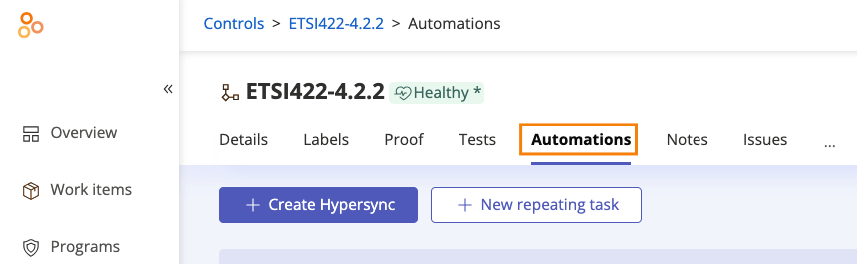
Click New repeating task.
The Repeating task window opens.
Create a repeating task based on a schedule or an event:
To create a schedule-based repeating task:
Below Repeats, select On a schedule.
Below Schedule, select when the task should repeat.
Below Starts repeating, select the date that the task should start.
Tip
For example, if you have a task that starts repeating on June 22, and it's due 14 days later, the task will be due on July 6.
To create an event-driven repeating task:
Below Repeats, select On an event.
Below Event, select the event that should trigger the task to repeat.
Depending on the option you choose, additional drop-down menus may appear.
Optionally, below Integration, click the available integration to link an external task or issue.
Click Save.
The repeating task is created. To view future tasks, select the Tasks tab.
Tasks overview video for compliance managers
Watch this short video about creating tasks, repeating tasks, and Jira tasks.
Tasks overview video for users
Watch this short video about creating tasks, repeating tasks, and Jira tasks.